

Shopify Chatbot Human Handoff: Small-Store Policy
Decide where AI answers stop, who takes over, and what shoppers should expect when your store is offline.
- Published
- Updated
- Reviewed sources
- Shopify Help Center, Gorgias, Intercom, and OAIC. Reviewed October 14, 2026. Read the source list.
Picture a founder packing orders while a shopper writes that their item arrived damaged. The chatbot explains the returns page, but the shopper wants someone to review a photo and decide what happens next. A Shopify chatbot human handoff policy should make that next step clear, even when the founder cannot reply right away.
What does a Shopify chatbot human handoff policy cover?
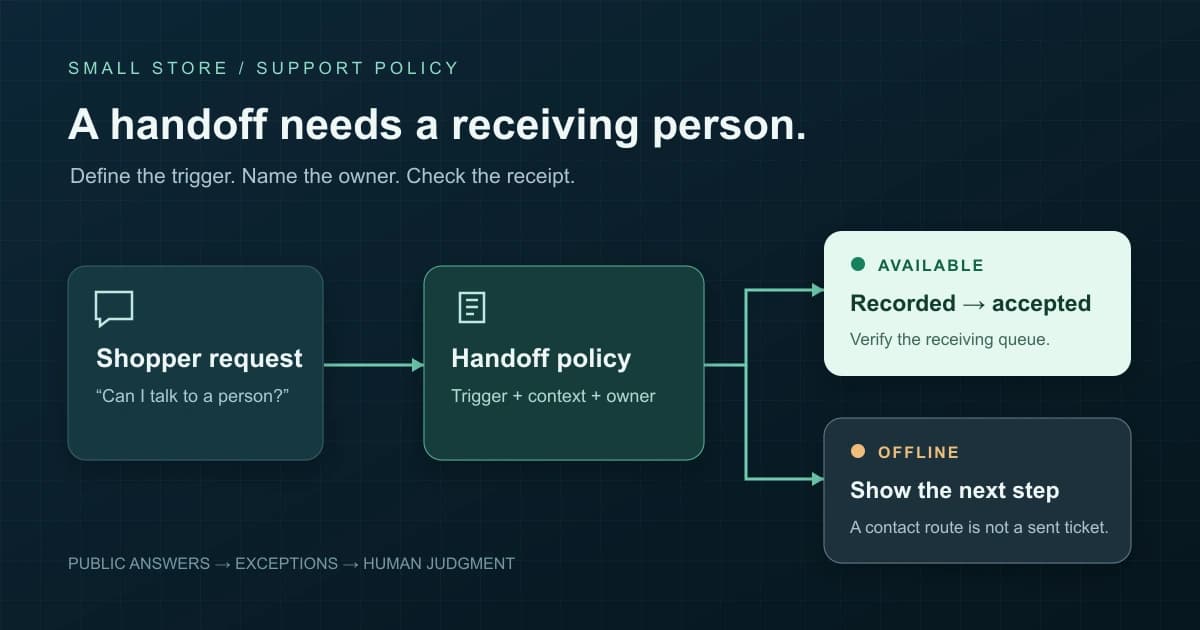
A Shopify chatbot human handoff policy defines when the assistant stops, where the request goes, and who owns the next step. It also sets the limits on answers and actions. For a small store, the policy should cover offline contact, saved chat details, and the proof needed before anyone promises a reply.
Use it as a shared plan between your chat tool and the person checking support. A setting called handoff might only create a ticket or show an email address.
| Request type | Permitted starting point | Who decides? |
|---|---|---|
| Public store question | Answer from approved product or policy content. | Store owner approves the source. |
| Private order question | Use a supported, approved lookup after identity checks. | Owner defines access and checks identity. |
| Change, refund, or exception | Explain the process and route the request. | Approved person approves the action. |
Start with your approved chatbot knowledge-base checklist. Keep the answer sources and the handoff rules separate: a shipping page tells the assistant what to say, while a handoff rule tells it when a person must take over.
Native chat is also changing. Shopify: Inbox overview now documents an opt-in Inbox agent, so do not assume Shopify Inbox always means a person answering. Write the policy around the mode your store actually uses.
Which customer requests should go to a person?
Route requests to a person when the shopper asks for one, the source cannot support an answer, or the next step needs judgement or access to private details. Choose triggers that fit your store. Refund exceptions, disputed deliveries, and account changes deserve clear limits because an answer alone cannot solve them.
| Trigger | Assistant step | Human responsibility |
|---|---|---|
| A shopper asks for a person | Stop the loop and start the supported handoff route. | Receive the request and confirm who will reply. |
| The source is missing or conflicts | State the gap; do not choose a policy by guessing. | Check the current source and correct the answer. |
| The answer keeps missing the issue | Preserve the question and the failed explanation. | Read the context and address the actual concern. |
| Damage, missing delivery, or a payment dispute | Explain the published reporting steps without promising an outcome. | Review evidence and decide the next step. |
| Refund exception or goodwill request | Explain the rule and pass on the requested exception. | Use the required authority to decide the case. |
| Address change or account access | Use the approved contact route and identity checks. | Verify identity before changing or sharing private details. |
Where does explanation end and approval begin?
A returns page can explain how to raise a request. It cannot decide every damaged-item claim or goodwill exception. Shopify: refunding orders says refunds require owner access or refund permission, and a refund that has started cannot be cancelled or reversed; make clear who can approve a refund before adding any action.
For example, a sample clothing store might allow the assistant to share size guidance but require a person to review a worn-item dispute. A document-only assistant should direct shoppers to an approved order-status route rather than inventing a shipping update.
Tool defaults differ. Intercom: Fin handoff rules sets out rules, guidance, and workflows; clear requests for a person can start a handoff, while some less clear wording may lead to another answer. Test language your shoppers use, such as asking to speak to the owner, instead of checking only one exact phrase.
Who owns the handoff in a one-person store?
The founder should name a lead owner for each handoff route and agree a backup only if someone can truly cover it. Give that owner a place to check waiting cases. Use separate states for a requested handoff, a recorded case, and an accepted case so everyone knows who will act.
If you run the store alone, you can be the lead owner without offering live coverage. Set check times around your other work. A private goal for follow-up helps you plan the queue, but it should become a public promise only when you can meet it.
| State | Meaning | Evidence to check |
|---|---|---|
| Requested | The shopper asked for help from a person. | A transcript records the request. |
| Route shown or send attempted | The chat offered contact steps or tried to create a case. | An address, link, or send event exists. |
| Recorded | The receiving system contains the case. | A case reference and readable context exist. |
| Accepted | A named owner has taken responsibility. | The owner marks the case as theirs. |
| Resolved | The agreed action and reply are complete. | The record states the outcome and any next step. |
Keep a short waiting list with case reference, owner, next action, and due time. A queue called unassigned still needs someone to claim it. When you hand work to a backup, ask them to say they have taken the case instead of assuming that access to the inbox means they are watching it.
What should happen when support is offline?
When support is offline, explain how to get in touch and whether the shopper must take another step. A queued request and a displayed email address are different results. Match the message to your tool, list support hours you can cover, and avoid promising live help when nobody is there to reply.
Shopify: support hours and first reply ties Inbox agent handoff to staff support hours. Its default is always available, so check the schedule against the hours you actually cover.
Shopify: Inbox chat help says staff handoffs during support hours go to Unassigned with past chat details. Outside those hours, the agent gives the sender email address and the customer must send an email themselves.
Other tools use different paths. Gorgias: AI Agent handoff settings documents offline email collection and warns that missing a required email can close a ticket. Review your own settings and receiving inbox before using wording from another tool.
Which message matches the actual state?
- Recorded case: Your request is in our support queue under [case reference]. We check this queue during [hours and time zone].
- Email address shown: Our team is offline. Please send your question to [support address]; this chat has not emailed it for you.
- Supported contact capture: Your request and contact details are recorded for follow-up during [hours]. Use this only after checking the saved case.
These are draft examples, not claims about a tested store. Fill in each blank and remove any promise you cannot verify. If capture fails, give a route that works and clearly state what the shopper still needs to do.
What details should the human receive?
A handoff should give the owner enough detail to act without asking the shopper to start again. Include the reason, the open question, the result the shopper wants, and a safe way to reply. Add private order details only when needed and verified; keep private customer cases out of public answer sources.
Use a small case summary
- Reason and question: What triggered handoff, and what remains unanswered?
- Source and attempts: Which approved page informed the answer, and what has already been tried?
- Requested outcome: Is the shopper asking for an explanation, review, change, or refund?
- Contact and reference: Which supported reply route and verified order reference are needed?
- Ownership and state: Where is the case, who owns it, and what happens next?
OAIC: APP 3 rules for collecting data says data collection must be reasonably necessary for APP entities. These rules do not cover every small Australian shop, but asking only for the details you need is a useful starting point. Avoid asking for full payment details just to route a question.
OAIC: AI tools and privacy also covers openness and care when personal details enter AI tools. Keep shared policy pages apart from private case records. If a closed case shows a gap in your answers, add an approved rule for all shoppers without copying the private chat into shared answer sources.
How do you write and configure the policy?
Write the policy in plain language before changing tool settings. List the allowed answers, choices that need a person, triggers, owner, support hours, and offline route. Then map each rule to a feature your tool supports. Where no feature exists, give a clear manual contact step instead of claiming that the tool has sent a request.
Copy this policy scaffold
Public answers: Use [approved sources and versions] for [allowed topics].
Limits: Do not approve [refund exceptions, order changes, or other excluded decisions].
Triggers: Route [person requests, source gaps, failed answers, and store-specific concerns].
Coverage: [Primary owner] checks [destination] during [hours and time zone]. [Agreed backup or offline plan] covers absence.
Outside hours: Use [supported capture or contact route]. Tell shoppers [the exact next step].
Case details: Collect [minimum fields] through [approved channel and identity check process].
Status wording: Say [route shown], [recorded], or [accepted] only when that event has evidence.
Closure: Record [decision, customer reply, next action, and owner] before closing.
First, check the source pack for outdated policies. Next, set the route and support hours, then trace a sample request into the receiving system. Finally, ask the owner to claim it. Saved settings prove that you changed a setting; the case and acceptance prove the path works.
For store-specific planning, connect this policy to your Shopify AI support workflow.
Watch the ticket workflow example
This existing demo shows a human handoff ticket workflow. Use it to see what details the person taking the case would need. It does not prove staffed support or email delivery for your store; check your own case record and confirm the owner has taken it before making those promises.
How do you test a handoff before shoppers rely on it?
Test the whole path from shopper request to the owner taking the case, during and outside support hours. Use invented details and compare the customer message with the receiving record. A handoff passes only when the route works, the chat details arrive, and the message describes what happened without claiming a later event.
| Sample input | Customer view to check | Receiving evidence to check |
|---|---|---|
| Public policy question | Answer agrees with the approved page. | No needless case; source can be checked. |
| Person request during support hours | Clear handoff state and next step. | Case arrives with context; owner accepts it. |
| Same request outside support hours | Honest offline route and contact steps. | Capture exists, or shopper-sent email arrives. |
| Unsigned visitor asking about an order | No invented order details or identity assumption. | The approved identity check route reaches the owner. |
| Missing source or refund exception | The assistant states the limit and stops guessing. | Reason and requested outcome reach the case. |
| Repeated failed answer | The shopper can leave the answer loop. | Earlier attempts remain visible to the owner. |
| Mobile visitor; lead owner absent | Contact controls work and hours stay accurate. | Backup accepts, or offline follow-up works. |
These are suggested checks, not reported test results. Mark each row pass or fail and save the date, settings, and case reference. For a visitor who is not signed in with new customer accounts, Shopify: Inbox chat help says visitors who are not signed in have no linked customer record, email, or order details.
Check the reply as well as the route
Open the receiving record on the device you use for support. Confirm the owner can read the open question, answer it, and record the result. Adapt your customer service email reply templates after reviewing the case, so the first human reply takes account of what the shopper already explained.
For later reviews, count accepted cases against recorded cases that need a person, using the same time window. Also note reopened cases and their reasons. These checks show different problems: no case owner, lost chat details, or an answer that did not solve the issue.
Retest after changes to routes, support hours, sources, or access. If the owner cannot receive or act on a sample case, fix that path before promising it to shoppers.
What else should small stores know about chatbot handoff?
Most handoff questions come down to the same boundary: the chat should describe the route it can support, while a person owns decisions and follow-up. Use these answers when reviewing shopper messages, staff notes, and tool settings. Keep each promise tied to a real event that you can check.
Can a shopper ask to bypass the chatbot?
Give shoppers a clear way to request a person, then check how your tool handles that request. Your store policy should say whether the assistant stops answering, asks for contact details, or shows an offline route. Test plain requests and less direct wording before you trust the setting.
Does a handoff mean an email was sent?
No. A handoff can mean that the chat showed an address, created a case, or placed a conversation in a queue. Those are different events. Check the receiving system before saying a message reached the team, and tell shoppers when they still need to send their own email.
Can an AI assistant refund a Shopify order?
Explaining a refund policy does not grant access or authority to issue a refund. Any action needs a supported connection, the right permissions, and store approval rules. For a small store, keep disputed eligibility and goodwill decisions with a person who can review the order and approve the outcome.
What if the store cannot offer live support?
Offer a clear offline route and publish the hours when someone checks it. Explain what the shopper must do next and what details to include. Use an honest follow-up window that your owner can meet, then review waiting cases when support resumes. Do not imply that someone is watching every chat.
Reviewed sources
Official help pages reviewed October 14, 2026. Tool examples describe how each tool works; the policy scaffold and acceptance checks are suggested ways to run support, not merchant test results.