

Examples and templates
30 Ecommerce FAQ Examples Small Stores Can Adapt Today
A copy-ready answer library for shipping, returns, products, payments, and escalation—plus a practical method for keeping every answer tied to current store facts.
- Author
- By Di - Founder of DocMindSolo founder building DocMind from Melbourne, Australia
- Published
- Updated
- Reviewed sources
- Shopify, Baymard Institute, ACCC, W3C, Google Search Central, and current retailer help pages.
TL;DR
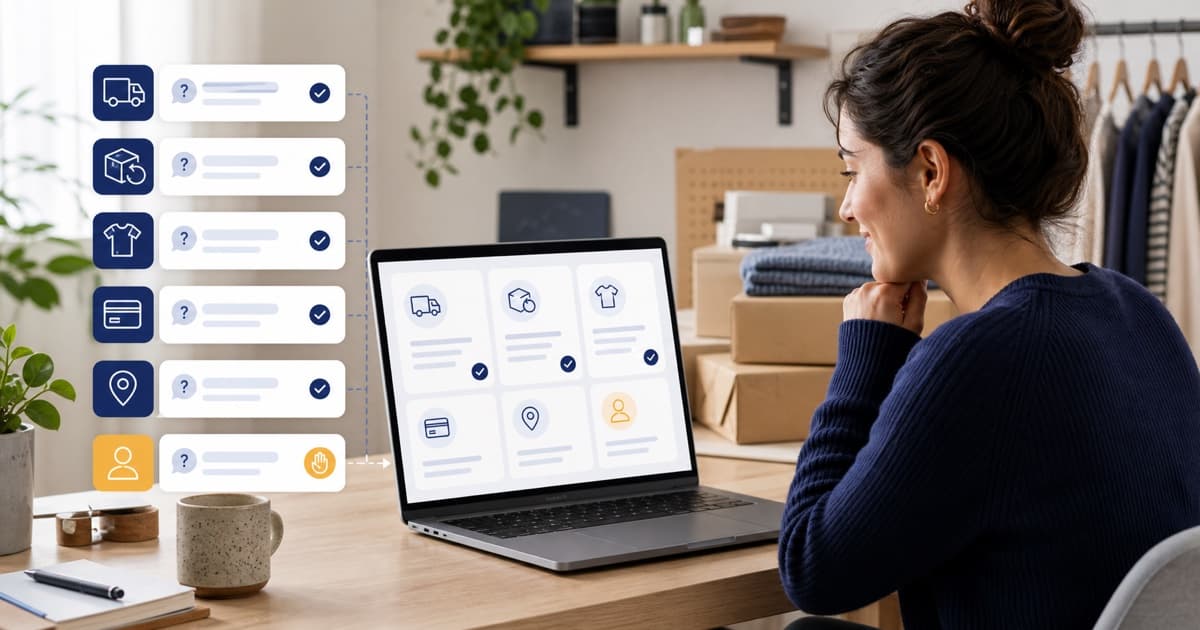
Strong ecommerce FAQs answer delivery costs, timing, returns, and product fit before lower-risk topics. Start with recurring questions from real conversations, adapt only the relevant templates below, place answers where decisions happen, and route live-order, evidence, exception, or legal questions to a person.
It is 9:40 pm. A shopper is ready to buy, but the delivery date, return rule, or product fit is unclear. A small uncertainty becomes a closed tab. The useful FAQ is not the longest one; it is the answer that appears at that decision point and states what happens next.
What should an ecommerce FAQ answer first?
Start with costs, delivery, and returns. Baymard’s current 2026 checkout data says 40% of abandonments involve extra costs, 20% involve slow delivery, and 13% involve an unsatisfactory return policy. Those facts make shipping charges, delivery windows, tracking, and return eligibility the first FAQ priorities—not an alphabetical list.
Treat the FAQ as a queue of unresolved decisions. Pre-purchase answers reduce hesitation; post-purchase answers reduce repeat contact. Pull questions from search, email, chat logs, reviews, product returns, and failed checkout notes. Then rank each question by frequency, customer risk, and whether the answer changes a buying decision.
When the answer depends on a specific order or exception, move from public content to the Shopify customer service email templates, which add live-data checks and human handoff rules.
| Priority | Question group | Why it belongs early | Source of truth |
|---|---|---|---|
| 1 | Shipping cost and delivery | Changes total cost and purchase timing. | Shipping settings and carrier promise. |
| 2 | Returns, exchanges, faults | Defines purchase risk and legal responsibility. | Current policy plus applicable law. |
| 3 | Product fit and compatibility | Prevents the wrong product choice. | Product data, guides, and testing. |
| 4 | Order changes and tracking | Reduces anxiety after payment. | Fulfilment process and live order tools. |
| 5 | Payments and promotions | Resolves checkout failures and offer confusion. | Payment provider and current promotion terms. |
For a deeper source audit before automation, use the Shopify chatbot knowledge-base checklist. It separates approved customer content from drafts, old campaigns, private data, and unsupported promises.
Which 30 ecommerce FAQ examples can a small store use?
Use these 30 examples as editable structures, not invented policy. They cover six high-value areas: shipping, orders, returns, products, payments, and handoff. Shopify’s current Knowledge Base guidance says merchants should review store settings and customer query logs, then write brief one- or two-sentence answers from those facts.
Shipping, tracking, and order examples
1. Shipping
When will my order ship?
Orders usually leave our warehouse within [X–Y business days]. During launches or public holidays, processing may take [updated window]. We will email your tracking link as soon as the carrier accepts the parcel.
2. Shipping
How long does delivery take?
After dispatch, delivery usually takes [X–Y business days] within [region] and [X–Y] elsewhere. These are estimates, not guarantees. Check the tracking link for the latest carrier update.
3. Shipping
How much is shipping?
Standard shipping costs [amount] and becomes free above [threshold]. Express and international prices appear at checkout after you enter the delivery address, before payment.
4. Shipping
Do you ship internationally?
We currently ship to [countries or regions]. The buyer is responsible for any duties or import taxes unless checkout says otherwise. See our shipping page for exclusions and current delivery estimates.
5. Tracking
Where is my order?
Open the tracking link in your dispatch email or visit [order-status URL]. If tracking has not moved for [X days], send us your order number so a person can check the carrier record.
6. Tracking
My order says delivered, but it is missing. What should I do?
Check safe places, household members, and the carrier’s delivery photo first. If the parcel is still missing, contact us with the order number. We will review the carrier evidence before confirming the next step.
7. Orders
Can I change my delivery address?
Contact us immediately with your order number and the correct address. We can update it only before packing or carrier collection. For security, we may ask you to confirm the email used at checkout.
8. Orders
Can I cancel or change my order?
We can try to change or cancel an order before it enters fulfilment. Send the order number and requested change as soon as possible. If packing has started, the normal return process may apply instead.
9. Pickup
Do you offer local pickup?
Local pickup is available from [location] during [hours]. Wait for the pickup-ready email before travelling. Bring the order confirmation and the identification method described in that email.
10. Packaging
Can you use gift or low-waste packaging?
Choose [gift or low-waste option] at checkout when available. Gift notes are [included/not available], and prices are [hidden/shown] on the packing slip. Packaging materials are described on [page].
Returns, refunds, and product examples
11. Returns
What is your change-of-mind return policy?
You may request a change-of-mind return within [X days] if the item is [condition rules]. [Customer/store] pays return postage. This policy is separate from rights that may apply when goods are faulty.
12. Returns
How do I start a return?
Submit your order number and return reason through [returns portal/contact link]. Wait for instructions before sending the item. Unauthorised parcels may go to the wrong address or delay assessment.
13. Exchanges
Can I exchange for another size or colour?
We offer exchanges for eligible items when replacement stock is available. Start through [portal]. If stock sells out before processing, we will follow the refund or store-credit option stated in our policy.
14. Refunds
When will I receive my refund?
We assess eligible returns within [X business days] after arrival. Approved refunds go to the original payment method. Your bank may need additional processing time after we issue the refund.
15. Faults
What if my item arrives damaged or faulty?
Contact us with the order number, a description, and clear photos. Do not discard the item or packaging until we reply. We will assess the problem and explain the available remedy under the applicable policy and law.
16. Final sale
Can I return a sale item?
Our change-of-mind rule for sale items is [rule]. This does not remove rights that may apply to faulty goods. Contact us if the item is damaged, unsafe, misdescribed, or otherwise has a problem.
17. Products
Which size should I choose?
Use the measurements in our [size guide] and compare them with a similar item you own. If you are between sizes, follow the product-specific fit note or send us your measurements before ordering.
18. Products
Will this product work with my device or space?
Check the compatibility list and dimensions on the product page. If your model or measurement is not listed, send it to us before purchase. We will not guess compatibility from a partial description.
19. Products
What materials or ingredients does this use?
The current material or ingredient list appears under [product section]. Check that list before ordering if you have an allergy, sensitivity, or technical requirement, and ask a qualified professional when appropriate.
20. Products
How do I care for or install the product?
Follow the steps in [care or installation guide]. Using a method outside those instructions may damage the item. Stop and contact us if the product, fittings, or instructions do not match what you received.
21. Stock
When will this item be back in stock?
Join the back-in-stock alert on the product page. We will email when inventory is available, but we cannot reserve stock through the alert. Any confirmed restock date will appear on the product page.
Payments, accounts, privacy, and handoff examples
22. Payments
Which payment methods do you accept?
Checkout currently accepts [methods]. Available options can vary by country, currency, or order value. Only rely on the methods shown in the secure checkout for your order.
23. Payments
Why was my payment declined?
We cannot see your bank’s private decline reason. Check billing details, available funds, and bank approval, then try again. If a pending charge remains without an order, send a screenshot with sensitive numbers hidden.
24. Discounts
Why is my discount code not working?
Confirm the code’s expiry, eligible products, minimum spend, and stacking rules on [promotion page]. If every condition is met, contact us before ordering and include the code plus a screenshot of the cart.
25. Discounts
Can I use more than one discount?
Discounts [can/cannot] be combined unless the offer says otherwise. Checkout will show the final eligible total before payment. We cannot add an expired or ineligible code after an order is placed.
26. Security
Is my payment information secure?
Payments are processed by [named payment provider]. Our store does not receive the full card number. Read the privacy policy for the data we collect and contact us before paying if anything looks unusual.
27. Accounts
Do I need an account to order?
[Guest checkout is available/An account is required]. An account can show [orders, addresses, returns], but it does not replace the order confirmation. Use the same email address when contacting support.
28. Subscriptions
How do I pause or cancel a subscription?
Open [account or subscription portal] before the next billing cutoff. The portal shows eligible pause, skip, and cancellation options. Contact us if access fails; do not send payment details by email.
29. Privacy
How do you use my personal information?
Our privacy policy explains what we collect, why we use it, service providers involved, retention, and available choices. For an access or deletion request, use [privacy contact or form].
30. Handoff
What if my question is not answered here?
Send us your order number, the product link, and the outcome you need through [contact channel]. A person will review questions involving exceptions, live account data, evidence, complaints, or decisions not covered by published policy.
What do strong ecommerce FAQ pages get right?
Shopify’s May 2026 guide reviewed 12 FAQ implementations and found recurring patterns: logical categories, prominent search, expandable answers, popular questions near the top, and links to next actions. The strongest real examples do not share one design; they make the customer’s likely next step obvious and keep support available.
| Current example | Pattern worth borrowing | Best fit | Watch-out |
|---|---|---|---|
| Skinnydip London | Deep return subtopics | Stores with many payment, gift-card, personalised-item, and international return variants. | A long help centre still needs clear contact and escalation routes. |
| FIGS | Action before explanation | Stores that can place a return or exchange action beside policy details and help links. | The portal must stay aligned with the written eligibility and refund timing. |
| Brooklinen | Category-led help | Catalogues that need product, shipping, rewards, and care answers in separate paths. | Category labels should use customer language, not internal team names. |
| TUSHY | Product-level instructions | Products where installation, compatibility, or troubleshooting needs video and written steps. | Technical guides must remain tied to the exact current product model. |
Large-brand screenshots are inspiration, not proof that the same information architecture fits a small catalogue. A focused store can often use one clear FAQ plus contextual product answers. A larger store may need search, nested categories, separate product help, and an authenticated order-status path.
Where should each FAQ answer appear?
Place answers in at least two layers: one canonical policy or help source and one decision-point surface. Shopify’s 2026 FAQ guide recommends reusing answers on product pages, carts, checkout, and chat. A central page alone makes shoppers leave the task they were trying to complete and search for context.
| Question type | Best visible location | Required source | Automation boundary |
|---|---|---|---|
| Shipping cost and delivery estimate | Product page, cart, central FAQ | Published shipping rules and checkout settings | Human review for remote areas or carrier disputes |
| Size, fit, compatibility, ingredients | Product page first | Current product data and guides | Human review when evidence is incomplete |
| Order status | Order-status page and chat shortcut | Authenticated live order data or tracking link | Never invent a status from static FAQ content |
| Returns and exchanges | Product page summary plus policy page | Approved return rules and applicable consumer law | Human review for faults, exceptions, or evidence |
| Discounts and promotions | Cart, campaign page, central FAQ | Current promotion terms and expiry | Human review when checkout conflicts with terms |
| Complaints, chargebacks, suspected fraud | Contact or ticket flow | Case evidence and staff policy | Always human-led |
Accordion controls also need keyboard access. The W3C accordion pattern specifies button semantics, aria-expanded, aria-controls, and Enter or Space activation. If the component hides answers from keyboard or screen-reader users, a tidy layout still fails.
How do you write FAQ answers that resolve the question?
Write the first answer in one or two direct sentences, then link the action or full policy. Shopify’s Knowledge Base instructions use that exact length for custom FAQ answers. A resolving answer states the rule, names the condition, gives the next step, and marks uncertainty instead of sending the shopper elsewhere without context.
Use a four-part answer shape
- 1. Direct rule: “Returns are available within [return window] for unworn items,” not “Please read our return policy.”
- 2. Conditions: State location, timing, product, condition, payment, or stock limits that change the answer.
- 3. Next action: Link the tracking page, returns portal, size guide, contact form, or current full policy.
- 4. Stop line: Say when a person must verify an order, inspect evidence, or approve an exception.
Keep a named owner and review trigger beside every source in your internal content register. Shipping owns delivery cutoffs; merchandising owns product data; support owns escalation; the founder or policy owner approves returns. When an answer changes, update the canonical source first, then every reuse surface.
How should Australian stores write returns FAQs?
Separate two policy paths: voluntary change-of-mind returns and remedies for faulty goods. The ACCC says businesses cannot remove consumer rights with “no refunds” wording, including on sale items. A returns FAQ should explain optional change-of-mind terms without presenting them as the limit of Australian Consumer Law rights.
Change of mind
State the voluntary window, item condition, exclusions, postage responsibility, exchange or credit options, and the return process. If the business offers this policy, the ACCC says it must follow the policy it publishes.
Faulty or misdescribed goods
Do not redirect the customer only to the manufacturer. Explain how to contact the store for assessment. The remedy depends on the problem and circumstances, so avoid an automated approval or refusal before evidence is reviewed.
Use the current ACCC repair, replace, refund and cancel guidance when drafting Australian wording. This guide is general education, not legal advice. Have a qualified adviser review unusual products, jurisdictions, warranties, or exclusions.
The ecommerce returns reduction guide covers the product-detail, sizing, exchange, and delivery content that can prevent avoidable returns before policy wording becomes necessary.
When should an FAQ become a help centre or chatbot?
Use three layers as complexity grows: visible FAQ content for repeat facts, conversational retrieval for finding approved answers, and people for live data or judgment. Shopify’s current Knowledge Base tracks questions and unmatched resources, which makes missing content visible. Automation should shorten the path to a verified answer, not expand authority.
| Use | Best when | Do not use it for |
|---|---|---|
| One FAQ page | A focused catalogue and a manageable set of stable questions. | Live order state or complex troubleshooting. |
| Searchable help centre | Many products, markets, workflows, or detailed guides. | Hiding the contact path behind endless articles. |
| Grounded chat | Customers phrase the same approved facts in many ways. | Guessing policy, identity, evidence, or undocumented exceptions. |
| Human handoff | The case needs verification, discretion, empathy, or action. | Repeating a public answer that self-service already resolves. |
See how fixed answers create a safe first layer
This walkthrough shows how a store can pin must-get-right replies for returns, refunds, warranty, and shipping before broader retrieval handles live questions. It supports the workflow described here; it does not replace policy review or human judgment.
Prefer the wider product context? The demo library also shows ecommerce chat, Shopify workflow, source setup, and human handoff.
If the immediate goal is fewer repetitive Shopify conversations, the grounded FAQ support workflow explains how to start with WISMO, returns, sizing, product, and policy questions without pretending every ticket is automatable.
Frequently asked questions
Google stopped showing FAQ rich results on 7 May 2026, so these answers are written for shoppers and clear extraction—not a promised search feature. Keep every visible answer on the page, align structured data with that text, and update both when shipping, returns, product, payment, or escalation rules change.
How many questions should an ecommerce FAQ page include?
There is no universal target. Start with the recurring questions that remove a buying or support obstacle, then add only what customers actually need. A small store needs clear answers for shipping, returns, product fit, payments, order changes, and the next human contact step—not a huge help centre built to reach an arbitrary count.
What are the most important ecommerce FAQ categories?
Prioritise shipping and delivery, returns and exchanges, product details, payments and discounts, order changes, and contact or escalation. Baymard’s 2026 checkout research highlights extra costs, slow delivery, and unsatisfactory return policies as recurring abandonment reasons, so those answers should appear before lower-risk account questions.
Should FAQ answers be placed on product pages too?
Yes, when the answer affects a purchase decision. Put sizing, compatibility, ingredients, care, installation, delivery estimates, and return links near the relevant product. Keep the central FAQ as the complete policy source, then reuse short, consistent answers on product, cart, tracking, and contact surfaces.
Does FAQ schema still create Google rich results?
No. Google stopped showing FAQ rich results on 7 May 2026 and later removed the supporting documentation. Clear question-and-answer markup can still describe page content to other machines, but stores should not promise a special Google result. Useful visible answers, internal links, and accurate product data matter more.
When should an ecommerce FAQ answer hand off to a person?
Hand off when the request needs identity verification, live order data, evidence review, a refund exception, a goodwill decision, fraud assessment, or legal judgment. The FAQ can explain the published process and collect context, but it should not approve an outcome that the store has not documented or authorised.
Reviewed sources
Reviewed on 29 July 2026 against current primary guidance and live retailer pages. Product statements were also checked against the current production demo and repository video definitions.
- Shopify — How to Create an FAQ Page + 12 Examples (2026).
- Shopify Help Center — Managing store FAQs with Shopify Knowledge Base.
- Baymard Institute — Cart abandonment rate statistics and checkout research (2026).
- Australian Competition and Consumer Commission — Repair, replace, refund, cancel.
- W3C WAI-ARIA Authoring Practices — Accordion pattern.
- Google Search Central — FAQ rich result retirement updates (2026).
- FIGS — Current returns and exchanges page.
- DocMind — Current product walkthrough library.